Works on Every Device
The same Log In window opens on desktop browsers, Safari on iPhone, Chrome on Android and the Android app, so one set of details covers every device.
Login at VipLuck in Australia: Quick Account Access
Sign in with your email or username and password to reach the pokies lobby, live casino, sportsbook and cashier on any device.
Login Security Checklist
What You Should Do
What You Should Avoid
Signing In Made Simple
Works on Every Device
The same Log In window opens on desktop browsers, Safari on iPhone, Chrome on Android and the Android app, so one set of details covers every device.
Email or Username
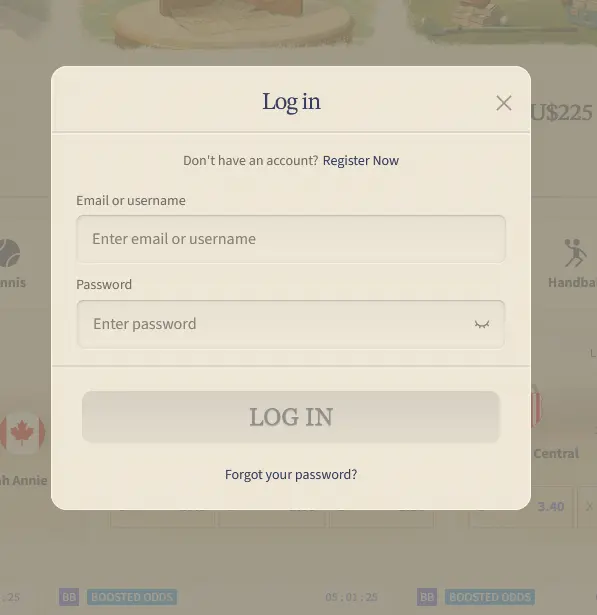
Type either your registered email address or your username into the first field, add your password and press Log In.
Two-Factor Security
Turn on 2FA in account settings to add a one-time code step, which blocks unauthorised access even if your password leaks.
VipLuck Casino signs players in with an email address or username plus a password. The first field on the Log In window is labelled Email or username, and the same details are used for password resets and messages from the support team. New here? The steps to Sign Up take only a few minutes.
Two-factor authentication (2FA) is an optional extra layer that is worth switching on. Once enabled in your security settings, each new login asks for a time-limited one-time code from an authenticator app or SMS, so a stolen password alone is not enough to open the account.
Signing in takes a few seconds, and the Log In window looks the same on PC, mobile and the app, so the steps below apply wherever you play.
Open your browser and go to vipluckcasino24.com. Click Log In in the top-right corner of the header, and the login window opens over the lobby. Enter your email or username, type your password and press Log In. If 2FA is active, enter the code on the next screen before you are let in.
On iPhone open Safari, and on Android open Chrome. Go to vipluckcasino24.com and tap Log In in the top bar next to Register. Fill in the same two fields and tap Log In. The eye icon inside the password field reveals what you typed, which helps on a small keyboard.

Players using the Android app downloaded from vipluckcasino24.com open it and tap Log In on the opening screen, then enter the same email or username and password. 2FA codes are requested in the same way as in the browser. iPhone and iPad players use Safari, since there is no App Store version.
A unique password is the first line of defence: if another site that shares your password is breached, the same password cannot then open your VipLuck account. Add 2FA in account settings and log out on shared devices after each session.
Every connection uses 256-bit SSL encryption, so data travelling between your device and the casino servers is protected against interception. If a message asks for your VipLuck password, treat it as fraud, because the team at [email protected] never asks for it. Deposit limits, session alerts and self-exclusion are set from the account settings after you log in, and the current welcome bonus and promotions are on their own page once you are inside.
Most login problems fall into five groups, and each has a quick fix.
Forgotten password is the most common. Click Forgot your password? below the password field, enter your registered email address and follow the link that arrives, usually within a few minutes. If it has not come after five minutes, check spam or junk before requesting a second link.
Wrong email or username catches players who use several addresses. Search your inbox for the welcome message from vipluckcasino24.com to see which address is linked to the account, then try that one.
Temporary lock appears after too many wrong passwords in a short period. It lifts automatically after a wait, and live chat can verify your identity and lift it manually if you need access sooner.
Browser or cache trouble can stop the window from loading. Clear cache and cookies or switch browser, and if the problem stays on mobile, try the Android app or email [email protected].
VPN or location conflicts can interfere with authentication, so switch the VPN off and try again from your normal connection.
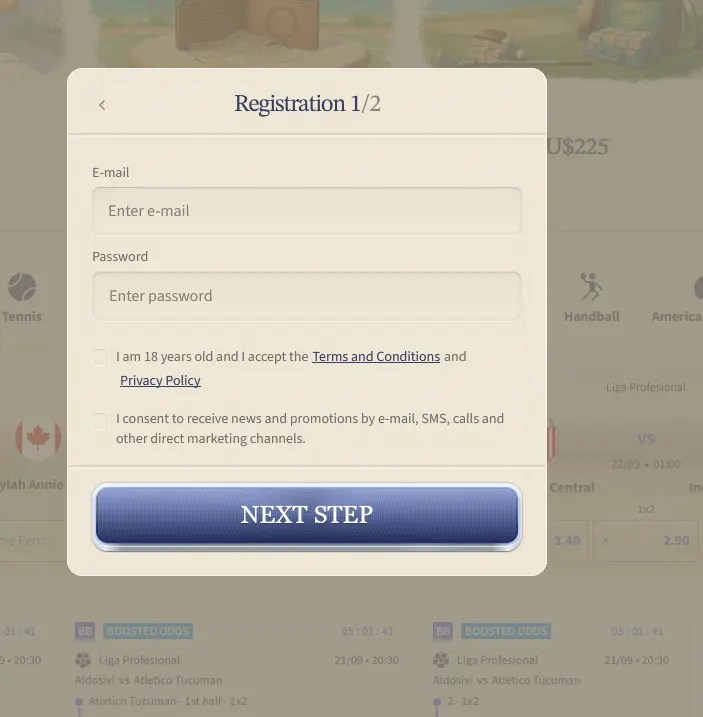
Registering at VipLuck Casino is a two-step form that asks for an email address and a password, plus a tick to confirm you are 18 or over and accept the Terms and Conditions and Privacy Policy. A second, optional box covers news and promotions by email, SMS and calls. No deposit is needed to register, though a qualifying deposit is needed to claim the welcome package. After that you sign in with the steps on this page.
Login Help - Common Questions
Click Forgot your password? under the password field, enter the email address registered to your account and follow the reset link sent to that inbox. If nothing arrives, check your spam folder or write to [email protected].
Yes. Open Safari, go to vipluckcasino24.com and tap Log In in the header. The full lobby, cashier and account settings work in the mobile browser without installing anything.
A temporary lock is applied automatically after repeated wrong passwords as a security measure. Wait 30 minutes and try again, or ask live chat support to lift it sooner.
Ready to Play? Log In Now
Grab 300% up to $10,000 and 300 free spins.
Join Now 18+ only. Gambling carries a risk of addiction. Bonus terms apply.